The Real Difference Between a Cheap Website and an Affordable One
A low price alone doesn't tell you which one you're getting. Here's how to actually tell them apart before you commit.
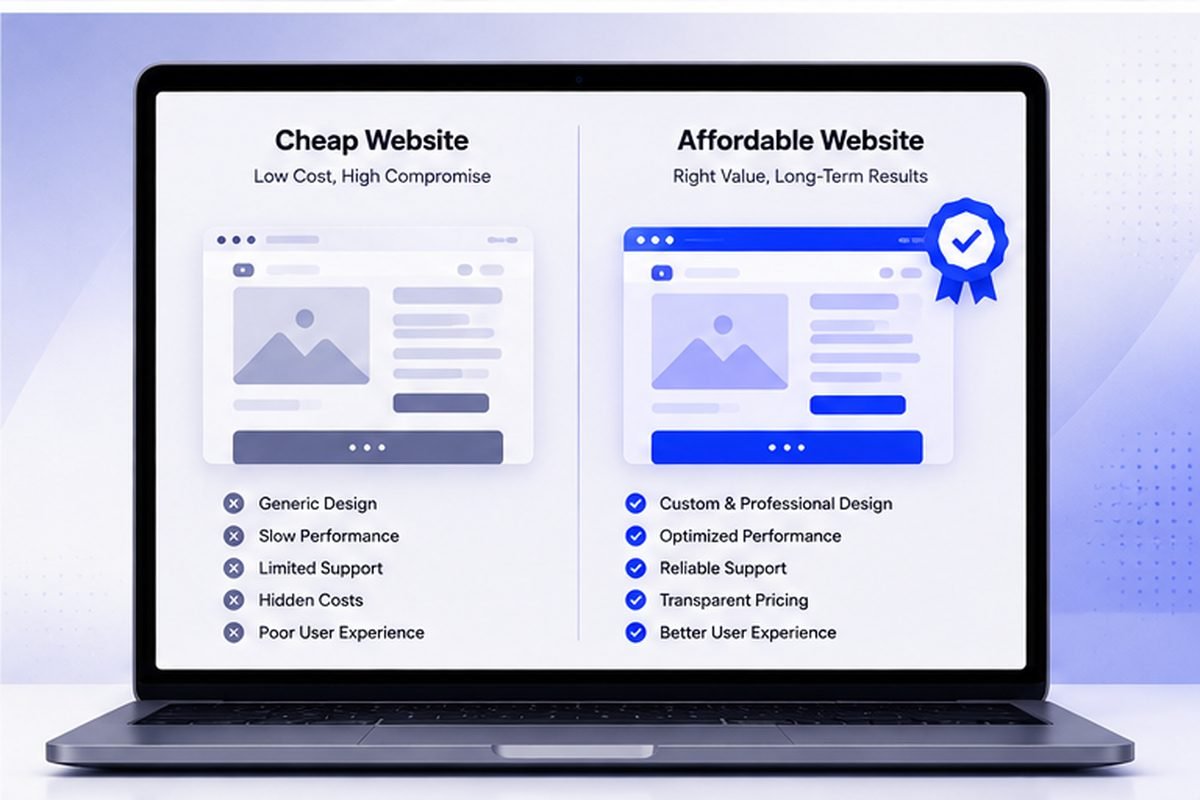
A $150 website and a $150 website can be two completely different things. One genuinely affordable. One cheap in the specific way that costs more later. The price tag alone won't tell you which is which.
A cheap website is one where cost was reduced by removing things that matter, usually ownership, accessibility, speed or support. An affordable website costs less because the way it is built and delivered costs less, with the same things included. The difference shows in what is missing from the quote, not in the price.
A Cheap Website Cuts What You Can't See Immediately
Skip mobile optimization. Use an unlicensed template. Ignore basic security. On day one, it looks exactly like a genuinely affordable site. The difference shows up later — poor search visibility, a mobile layout that breaks, a security hole nobody notices until something's already gone wrong. That low price wasn't a discount. It was a bill, deferred, usually with interest.
A Genuinely Affordable Website Cuts Overhead, Not Substance
A real efficiency gain looks different. An AI-enhanced workflow removing repetitive build work. A leaner process without unnecessary discovery calls and management layers stacked on top. That kind of savings never touches what actually matters — mobile responsiveness, real design attention, working forms, basic search fundamentals. The price comes down because of how the site gets built, not because of what got quietly left out.
“The real price of a website isn't what you pay at launch. It's what it costs to keep working properly afterward.”
Questions That Actually Reveal Which One You're Getting
Three questions separate the two fast. Is the design genuinely custom, or a barely-touched template? Does it actually work on a real phone, not just a resized browser window? What happens if something breaks after launch — is support genuinely included, or a surprise invoice once it's already broken? A provider offering a low price should answer all three specifically. Vague answers are the warning sign, not the price itself.
What This Looks Like in Practice
WebBizora's packages start at $1,199, and even the smallest tier includes genuine custom responsive design, real mobile optimization, and a defined support window after launch — because the price reflects an efficient process, not a stripped-down product. Ask any provider, not just this one, exactly what's included before assuming a low number means a lesser website. It often doesn't. Sometimes it does. The only way to know is to ask.
The Long-Term Test
Here's the test that actually works: a genuinely affordable website looks and works the same a year later, needing nothing but normal content updates. A cheap one reveals itself over time — search visibility that never took off, a layout that breaks with a browser update, a "quick fix" that ends up costing more than the original site did. The real price of a website isn't what you pay at launch. It's what it costs to keep working properly afterward.
Key Takeaways
- A cheap website often defers costs to later — poor search visibility, a broken mobile layout, or a security liability.
- A genuinely affordable site cuts overhead (unnecessary discovery calls, management layers), not substance.
- Ask directly: is the design genuinely custom, is it properly mobile-responsive, and what happens if something breaks?
- A year later is the real test — a genuinely affordable site still looks and works the same; a cheap one reveals its shortcuts.
Quick Answers
Ask specifically about mobile responsiveness, whether the design is genuinely custom, and what post-launch support is included. Vague or evasive answers to any of these are the real warning sign.
Not automatically. A higher price can mean genuine extra value, or it can just mean a traditional agency's overhead that a leaner process doesn't need to charge for. Compare what's actually included, not the price alone.
At minimum: genuine mobile responsiveness, a working contact method, and clarity on what happens if something needs fixing after launch. See the pricing breakdown for what's in each tier.
Ready to Talk About Your Own Website?
Straight answers, no pressure — tell us what you're building.
More From the Blog
What a Real Estate Website Costs — and Why the Listings Often Cannot Be Found
Quotes run from $200 to $25,000, and the line item that breaks most of them is IDX. Worse, the way IDX is usually installed hides your listing pages from Google entirely.
Read Article
What a Law Firm Website Actually Costs — and Who Ends Up Owning It
Quotes run from $1,000 to $100,000 for what sounds like the same thing. The number matters less than a question most firms never ask until they try to leave.
Read Article
A Year of the European Accessibility Act: What Actually Happened
Enforcement began in June 2025. A year later the picture is genuinely mixed — real court action, real investigations, and, depending on which source you trust, possibly not a single fine.
Read Article